 Prince Krampah
Have you ever noticed that when you send a long prompt to an LLM, there is a little pause before the first word appears, and then the rest of the answer streams out quickly? Or wondered why long contexts cost so much more to serve?
A big part of the answer is something called the KV cache. It is one of the most important tricks that makes LLMs fast enough to use, and once you understand it, a lot of things about LLM speed, memory and pricing start to make sense.
In this article, we’ll go over why LLMs need a KV cache, how it works, what it costs in memory, and what this means for you when you build with LLMs. We’ll also write a tiny attention head from scratch in Python to see the difference with our own eyes.
A Quick Refresher: Generating One Token At A Time
LLMs are autoregressive: they generate one token, append it to the input, and then run again to generate the next one. In the previous article on temperature, top-k and top-p, we looked at how the model picks that one next token. Now let’s look at what happens across many steps.
Inside every attention layer, each token is turned into three vectors: a query, a key and a value. To produce the next token, the newest token’s query is compared with the keys of all the tokens before it, and the resulting attention weights are used to mix their values. If you want a deeper walkthrough of this, it’s covered step by step in my free course Transformer LLMs: The Basics.
Here is the important part: to generate token number 500, the model needs the keys and values of the 499 tokens before it. To generate token 501, it needs the keys and values of the 500 tokens before it. Notice anything?
The Problem: Doing The Same Work Over And Over
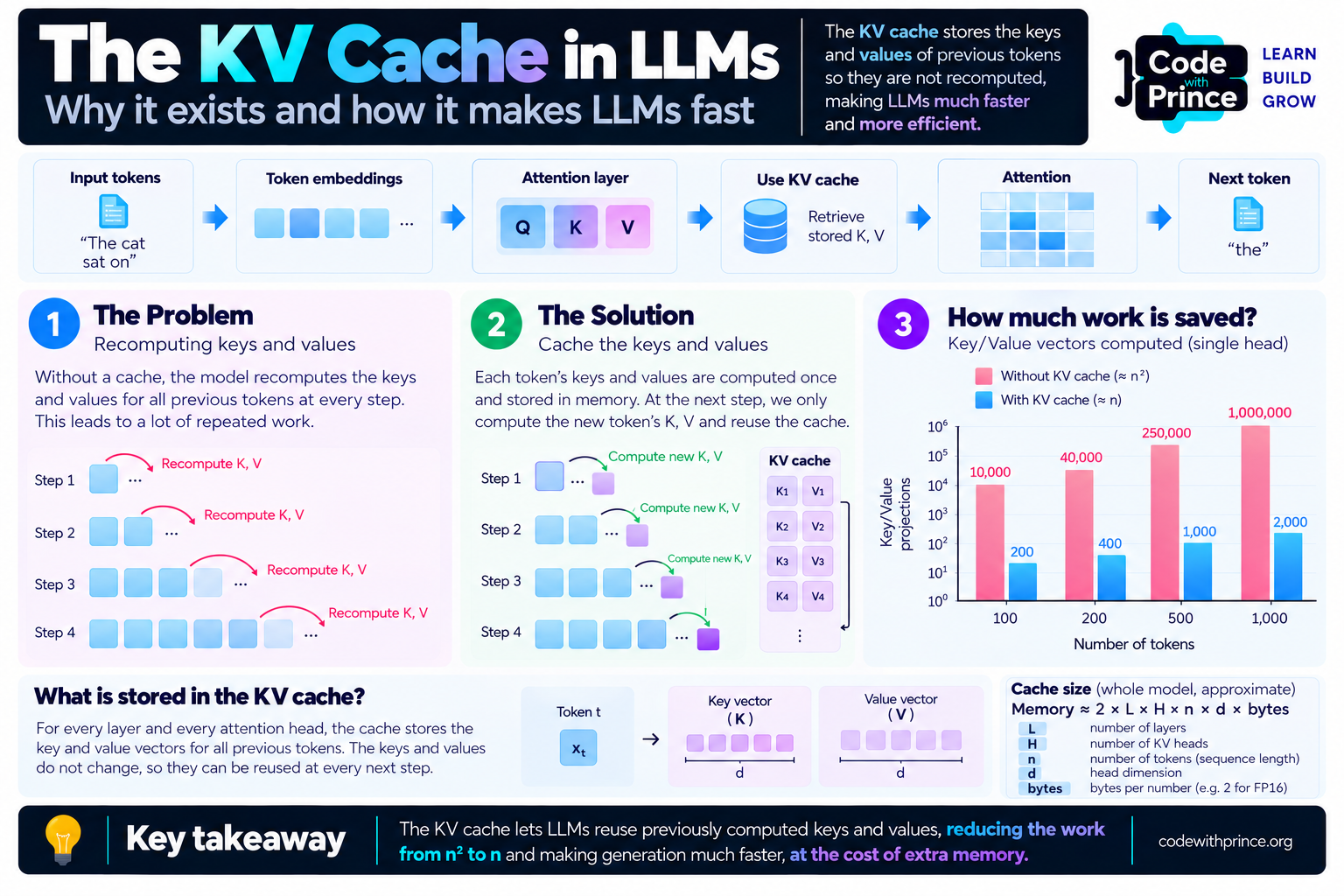
Without any optimization, the model would recompute the keys and values for every previous token at every single step. Token 1’s key gets computed when generating token 2, then again for token 3, then again for token 4, and so on.
The thing is, those keys and values never change. In decoder LLMs like GPT and Llama, attention is causal: a token can only look at the tokens before it, never after it. So the key and value of token 1 in a given layer depend only on token 1 and what came before it. Generating new tokens later on doesn’t affect them at all. We are recomputing the exact same numbers again and again.
The Fix: Cache The Keys And Values
The KV cache is exactly what it sounds like. Every time the model computes the key and value vectors for a token, it stores them in memory, for every layer and every attention head. At the next step, it only computes the key, value and query for the one new token, appends the new key and value to the cache, and runs attention against everything in the cache.
Why don’t we cache the queries too? Because we only need the query of the newest token. The queries of older tokens were only needed to produce outputs for those older positions, which we already have.
The result is the same output, with far less work:
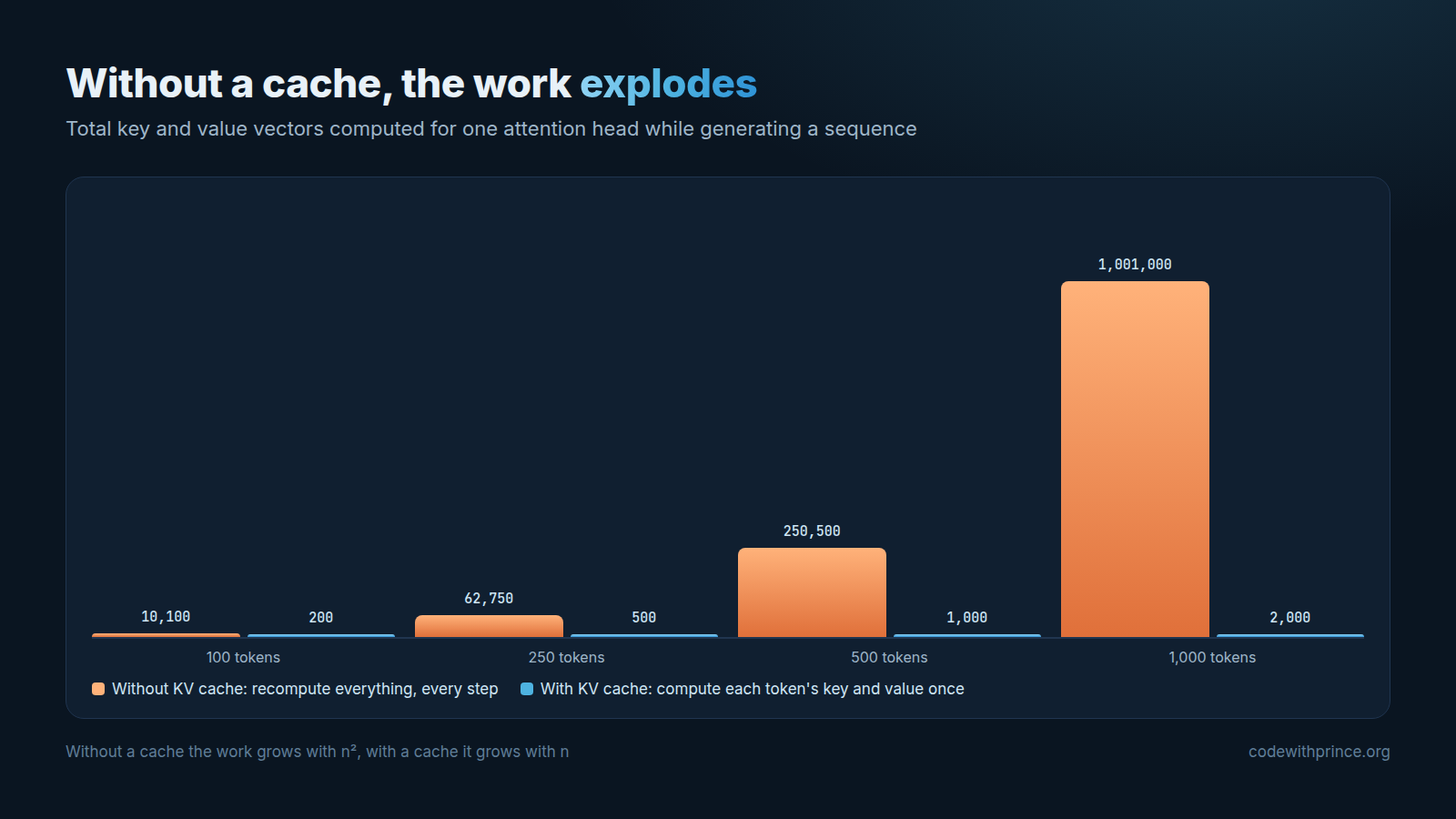
Without a cache, generating n tokens means computing roughly n² key and value vectors. With a cache, it’s just n. For 1,000 tokens, that is about a million vectors versus 2,000, and that’s for a single attention head in a single layer.
Let’s See It In Python
Here is a tiny single attention head written with only the Python standard library. We run it twice over the same 100 tokens: once recomputing everything at each step, and once with a KV cache. Then we count the work and check that the outputs match.
import math
import random

random.seed(0)
d = 8  # embedding / head size


def rand_matrix(rows, cols):
    return [[random.gauss(0, 0.5) for _ in range(cols)] for _ in range(rows)]


def matvec(M, x):
    return [sum(m * xi for m, xi in zip(row, x)) for row in M]


W_q, W_k, W_v = rand_matrix(d, d), rand_matrix(d, d), rand_matrix(d, d)
projections = 0  # how many key/value vectors we compute


def project(W, x):
    global projections
    projections += 1
    return matvec(W, x)


def attend(q, keys, values):
    scores = [sum(a * b for a, b in zip(q, k)) / math.sqrt(d) for k in keys]
    m = max(scores)
    weights = [math.exp(s - m) for s in scores]
    total = sum(weights)
    return [sum(w * v[i] for w, v in zip(weights, values)) / total for i in range(d)]


tokens = [[random.gauss(0, 1) for _ in range(d)] for _ in range(100)]

# Without a cache: recompute keys and values for every previous token at every step
projections = 0
outputs_no_cache = []
for t in range(len(tokens)):
    keys = [project(W_k, x) for x in tokens[: t + 1]]
    values = [project(W_v, x) for x in tokens[: t + 1]]
    q = matvec(W_q, tokens[t])
    outputs_no_cache.append(attend(q, keys, values))
print("Without KV cache:", projections, "key/value projections")

# With a cache: compute the new token's key and value once, then reuse them
projections = 0
k_cache, v_cache = [], []
outputs_cache = []
for t in range(len(tokens)):
    k_cache.append(project(W_k, tokens[t]))
    v_cache.append(project(W_v, tokens[t]))
    q = matvec(W_q, tokens[t])
    outputs_cache.append(attend(q, k_cache, v_cache))
print("With KV cache:   ", projections, "key/value projections")

same = all(
    abs(a - b) < 1e-12
    for out1, out2 in zip(outputs_no_cache, outputs_cache)
    for a, b in zip(out1, out2)
)
print("Same outputs?    ", same)
Running it gives:
Without KV cache: 10100 key/value projections
With KV cache:    200 key/value projections
Same outputs?     True
Same answer, 50 times less work, and the gap keeps growing as the sequence gets longer. If you have Hugging Face Transformers installed, you can see the same effect on a real model. The cache is on by default, so we turn it off to compare:
import time
from transformers import AutoModelForCausalLM, AutoTokenizer

tok = AutoTokenizer.from_pretrained("gpt2")
model = AutoModelForCausalLM.from_pretrained("gpt2")
inputs = tok("The KV cache is", return_tensors="pt")

for use_cache in (True, False):
    start = time.time()
    model.generate(**inputs, max_new_tokens=200, do_sample=False,
                   use_cache=use_cache, pad_token_id=tok.eos_token_id)
    print(f"use_cache={use_cache}: {time.time() - start:.2f}s")
The run without the cache will be noticeably slower, and the difference grows as you increase max_new_tokens.
Prefill And Decode: Why The First Token Is Slow
The KV cache splits generation into two phases:
- Prefill. The model processes your whole prompt at once, in parallel, and fills the cache with the keys and values of every prompt token. This is heavy on computation, and it is the pause you notice before the first word appears. This delay is called the time to first token, and the longer your prompt, the longer it takes.
- Decode. The model generates the answer one token at a time, each step adding a single key and value to the cache. Each step does relatively little math, but it has to read the model’s weights and the whole cache from memory. That is why this phase is usually limited by memory speed rather than by computation.
The Catch: Memory
Nothing is free. We traded computation for memory, and the KV cache can get big. Its size per token is:
2 (key and value) × layers × KV heads × head size × bytes per numberTake Llama 2 7B: 32 layers, 32 heads, a head size of 128, and 2 bytes per number in 16-bit precision. That gives 2 × 32 × 32 × 128 × 2 = 524,288 bytes, or about 0.5 MB for every single token. A 4,096 token conversation needs about 2 GB of cache, on top of the model itself, for just one user.
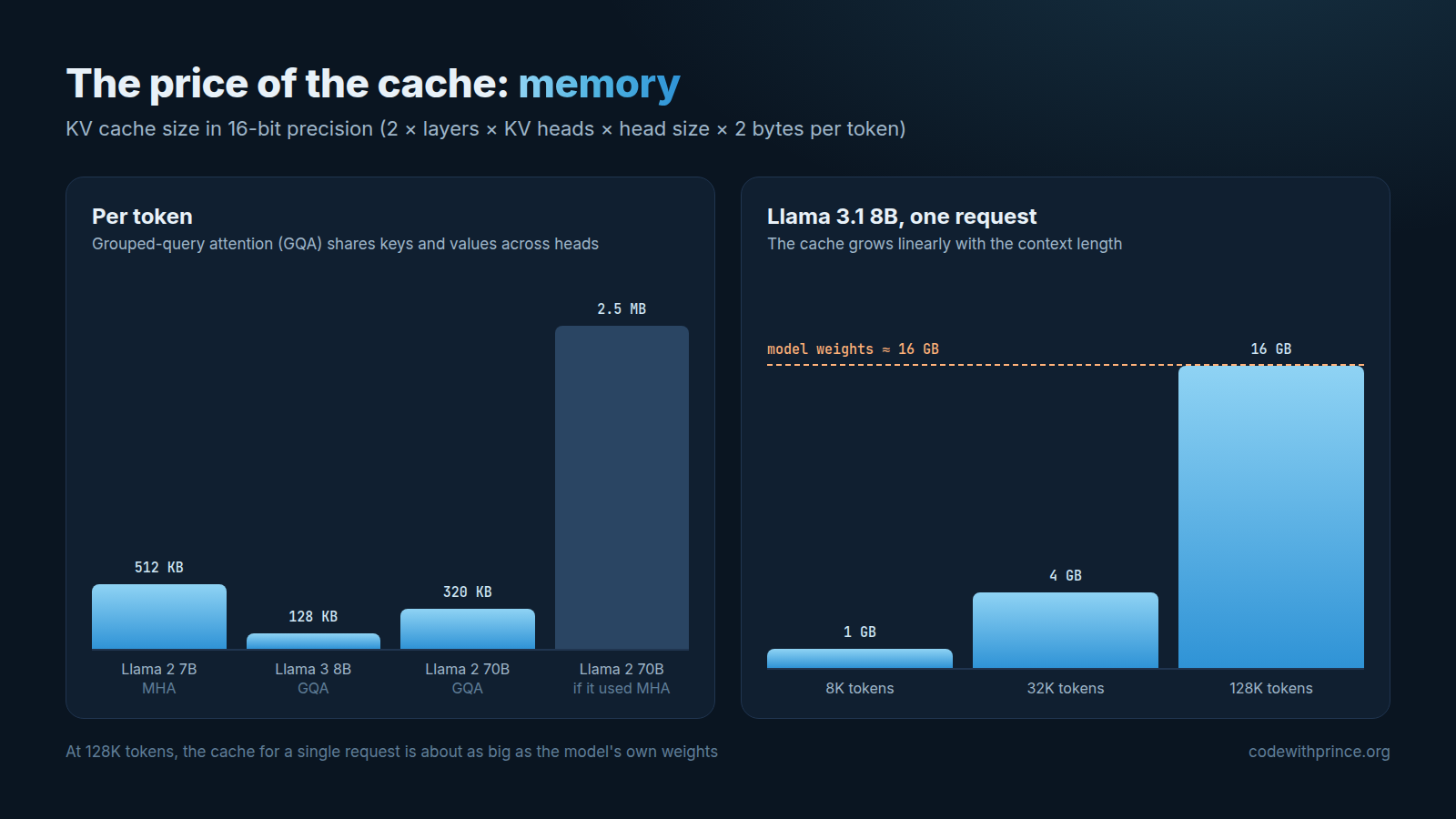
Now look at the right side of the chart. Llama 3.1 8B supports a context of 128K tokens. At full length, the KV cache for one request is about 16 GB, roughly the same size as the model’s own weights in 16-bit precision. Let that sink in for a second. This is a big reason why long context windows are expensive to serve, and why the number of users a GPU can handle at once is often limited by cache memory, not by the model.
How Models Shrink The Cache
Because the cache is so expensive, a lot of recent work goes into making it smaller:
- Multi-query and grouped-query attention (MQA and GQA). Instead of every attention head having its own keys and values, groups of heads share them. Llama 3 8B uses 8 KV heads instead of 32, which cuts the cache to 128 KB per token, four times less than Llama 2 7B. Llama 2 70B uses GQA too: without it, its cache would be 2.5 MB per token instead of 320 KB. We cover MQA and GQA in the last lesson of the course.
- PagedAttention. Used by the vLLM serving library, it stores the cache in small blocks, a bit like how an operating system manages memory pages, so far less memory is wasted and more requests fit on one GPU.
- Cache quantization. Storing the cached keys and values in 8 or even 4 bits instead of 16, trading a little accuracy for a lot of memory.
- Sliding window attention. Some models, like Mistral 7B, only attend to the most recent few thousand tokens in each layer, so the cache stops growing after that point.
What This Means For You
Even if you only call LLMs through an API, the KV cache affects you:
- Long prompts slow down the first token. If your app feels slow to start answering, look at how much you are putting into the prompt.
- Use prompt caching. Providers like OpenAI and Anthropic can keep the KV cache of a prompt prefix and reuse it on your next request, which makes those cached input tokens faster and cheaper. It only works when the beginning of the prompt is exactly the same, so put the parts that don’t change first (system prompt, instructions, reference documents) and the parts that change last (the user’s question).
- Self-hosting? Budget memory for the cache. When picking a GPU, don’t just check that the model weights fit. Leave room for the KV cache of every request you want to serve at the same time, at the context length you plan to support.
- Don’t stuff the context just because you can. Just like we saw in Why LLMs Get “Lost in the Middle”, more context isn’t always better for quality, and now you know it isn’t free for speed and memory either.
Key Takeaway
The KV cache trades memory for speed: compute each token’s keys and values once, and reuse them for every token that follows.
It is the reason LLMs can stream answers quickly, the reason the first token takes the longest, and one of the main reasons long contexts are expensive. Many of the newer architecture tricks, like grouped-query attention, exist mostly to keep this cache under control.
That’s all I wanted us to go over in this article. If you found it useful, share it with someone who is building with LLMs, and see you in the next one.
Cheers!