 Prince Krampah
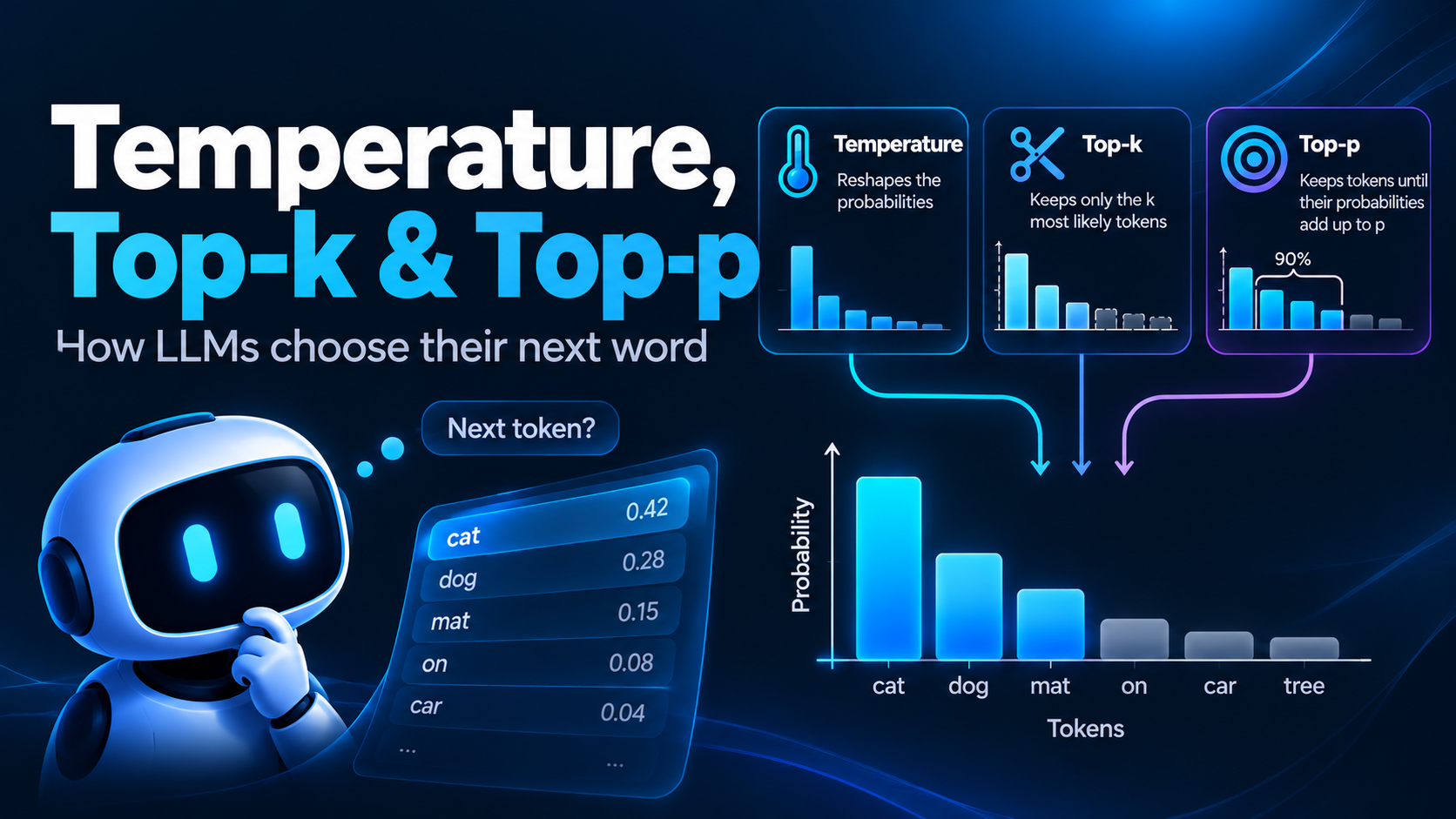
Have you ever asked an LLM the exact same question twice and gotten two different answers? Or played around with the temperature slider in a playground and wondered what it is actually doing under the hood?
Every time an LLM generates a token, it does not just “know” the next word. It produces a probability for every token in its vocabulary, and then something has to pick one. That something is the sampling strategy, and the three settings that control it are temperature, top-k and top-p.
In this article, we’ll go over what each of these settings does, how they differ, and which values to use for different kinds of tasks. We’ll also write a small sampler from scratch in Python so you can see all three in action.
First, Where Do The Probabilities Come From?
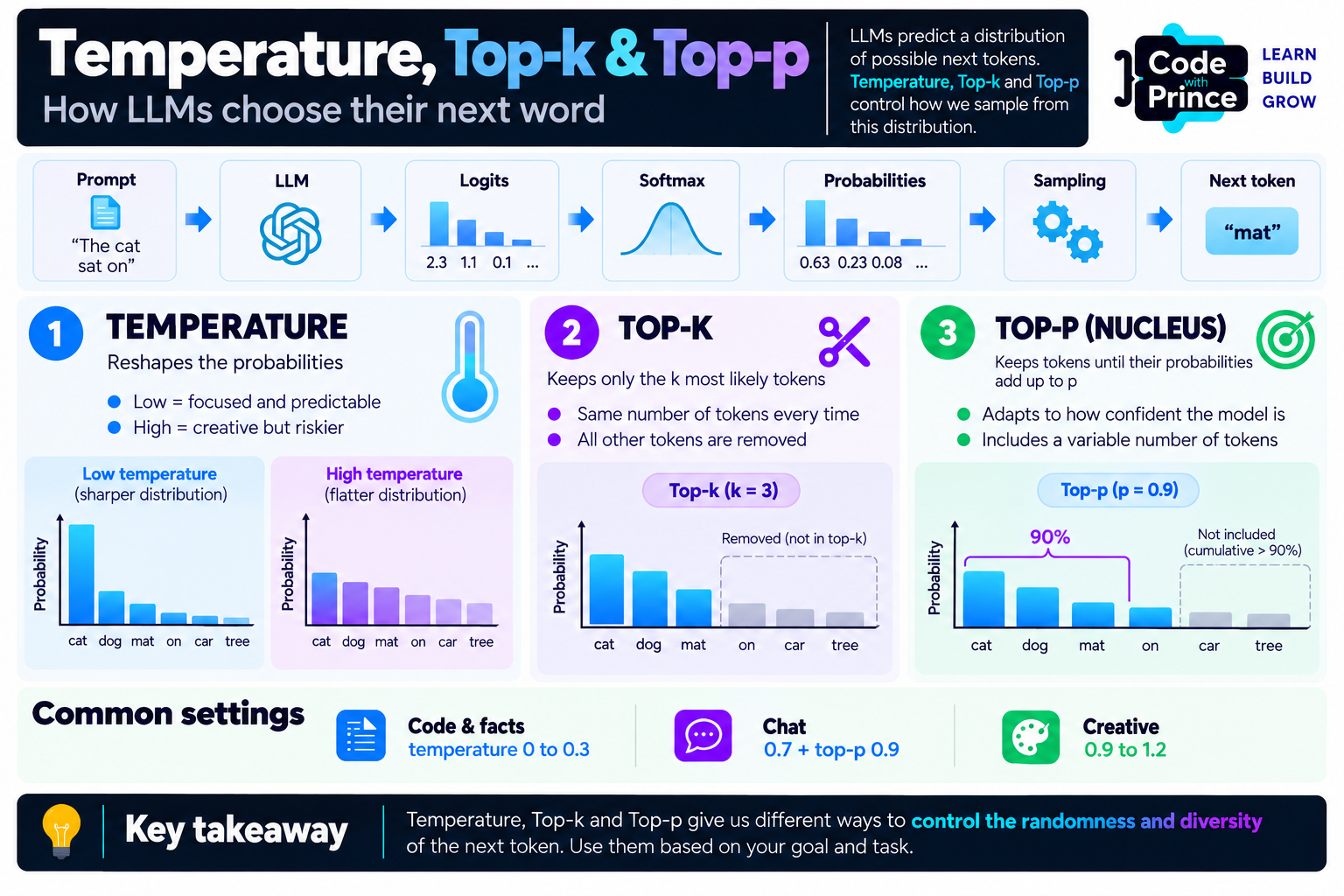
When a Transformer LLM processes your prompt, the last step is the language modeling head. It outputs one raw score, called a logit, for every token in the vocabulary. These logits can be any number, positive or negative, so we pass them through a softmax function, which turns them into probabilities that add up to one.
Let’s use a simple example throughout this article. Say the prompt is "The cat sat on the" and the model gives us these probabilities for the next token:
- mat: 52%
- floor: 23%
- sofa: 12%
- bed: 7%
- roof, table, moon and so on share the rest
The simplest strategy is greedy decoding: always pick the most likely token, so “mat” every single time. It sounds sensible, but in practice greedy decoding tends to produce bland and repetitive text, sometimes getting stuck repeating the same phrase over and over. The alternative is to sample: pick “mat” 52% of the time, “floor” 23% of the time, and so on. This is where our three settings come in.
Temperature: Reshaping The Distribution
Temperature is the setting most people know, and it is surprisingly simple. Before applying softmax, we divide every logit by the temperature:
probabilities = softmax(logits / temperature)That one division changes the shape of the whole distribution:
- Temperature below 1 makes the distribution sharper. The gaps between the logits get bigger, so the top token becomes even more likely and the unlikely ones almost disappear.
- Temperature of 1 leaves the model’s original distribution unchanged.
- Temperature above 1 makes the distribution flatter. The gaps shrink, so less likely tokens get a bigger share of the probability.
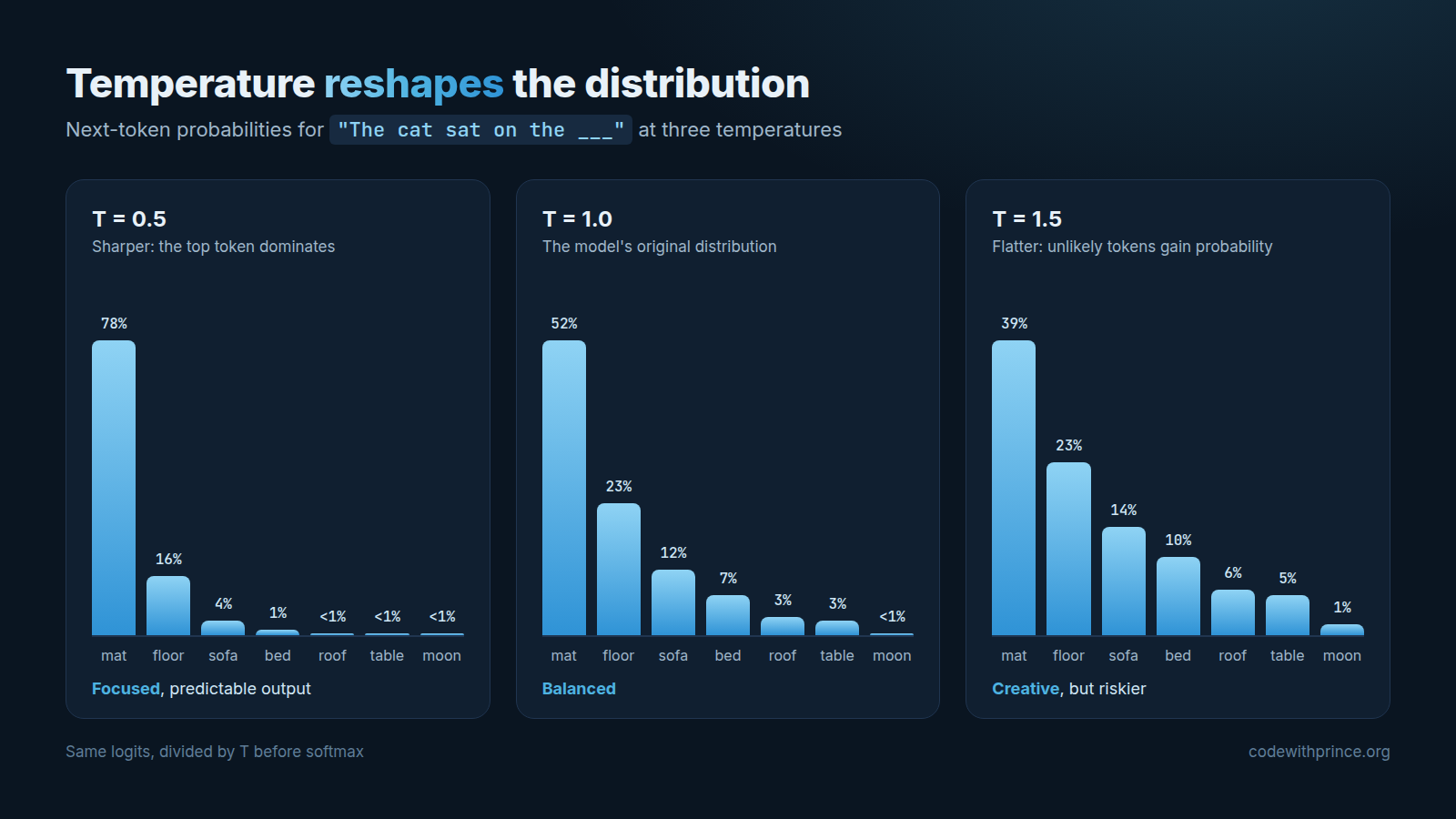
Look at what happens to “mat” in our example. At a temperature of 0.5, it jumps from 52% to 78%. At 1.5, it drops to 39%, and even “moon” goes from almost nothing to about 1%. The model did not learn anything new, we just changed how bold it is allowed to be.
What about a temperature of 0? You can’t divide by zero, so libraries and APIs treat it as a special case and simply fall back to greedy decoding. That is why temperature 0 gives you (almost) the same answer every time. I say “almost” because small differences in floating point math and batching on the provider’s servers can still cause tiny variations.
You might also be wondering why temperature can go above 1. Mathematically, it can be any number greater than 0, but the allowed range depends on the provider. OpenAI’s API accepts 0 to 2, Anthropic’s accepts 0 to 1, and Hugging Face accepts any positive value. Keep this in mind when you see recommended values: a 1.2 on one API may not even be allowed on another.
Top-k: Keep Only The k Best Tokens
Temperature changes the probabilities, but it never removes any token. Even at a reasonable temperature, a vocabulary of over 100,000 tokens means there is a long tail of nonsense tokens, each with a tiny probability. Individually they are unlikely, but together they can add up, and every now and then the model will pick one and go off the rails.
Top-k sampling fixes this by cutting off the tail. It keeps only the k most likely tokens, sets everything else to zero, and renormalizes the remaining probabilities so they add up to one again. With k = 3 in our example, only “mat”, “floor” and “sofa” survive, and their probabilities become roughly 60%, 27% and 13%.
The problem with top-k is that k is fixed, no matter how confident the model is. Take the prompt "The capital of France is". The model is about 94% sure the answer is “Paris”, but top-k with k = 3 still keeps “Lyon” and “Marseille” in the running. On the other hand, when many tokens are reasonable, like in a creative story, k = 3 may be far too strict. One number can’t be right for both situations.
Top-p: Keep Tokens Until You Hit p
Top-p sampling, also called nucleus sampling, was introduced in the paper “The Curious Case of Neural Text Degeneration” (Holtzman et al.) to solve exactly this problem. Instead of keeping a fixed number of tokens, it sorts the tokens from most to least likely and keeps adding them until their probabilities add up to at least p.
With p = 0.9:
- For
"The cat sat on the", we need mat + floor + sofa + bed (52 + 23 + 12 + 7 = 94%) to reach 90%, so 4 tokens are kept. - For
"The capital of France is", “Paris” alone is already 94%, so only 1 token is kept.
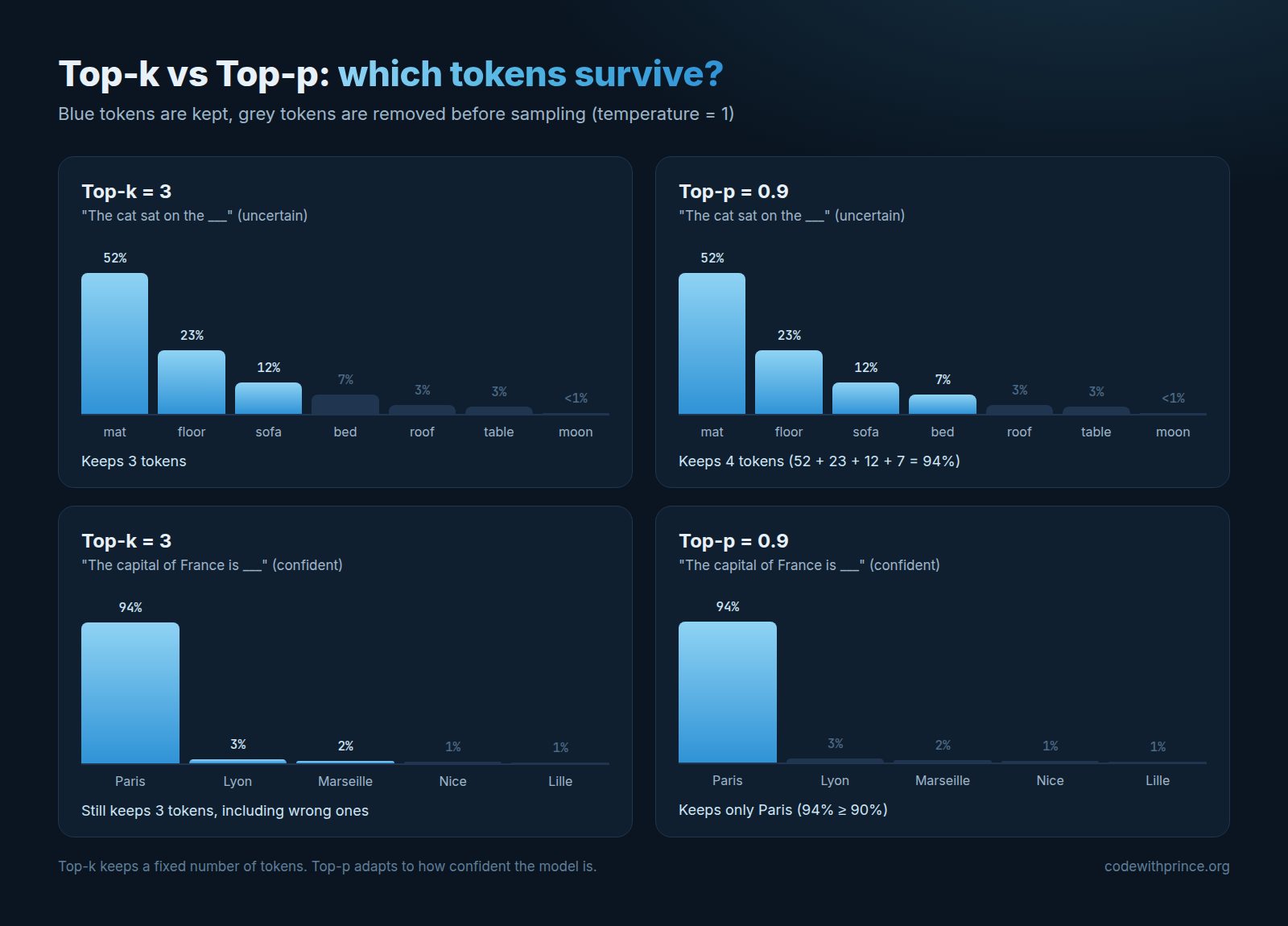
This is the beauty of top-p: it adapts. When the model is confident, the set of candidates shrinks. When the model is unsure, it grows. That is why top-p is the default in most APIs and libraries today, usually with a value around 0.9 to 0.95.
Putting It All Together In Python
In practice, these settings are applied one after the other. Libraries like Hugging Face Transformers first apply temperature, then top-k, then top-p, and finally sample from whatever is left. Here is a small sampler that does exactly that, using only the Python standard library:
import math
import random


def softmax(logits, temperature=1.0):
    scaled = [x / temperature for x in logits]
    m = max(scaled)
    exps = [math.exp(x - m) for x in scaled]
    total = sum(exps)
    return [e / total for e in exps]


def sample_next_token(tokens, logits, temperature=1.0, top_k=None, top_p=None):
    # 1. Temperature: reshape the distribution
    probs = softmax(logits, temperature)
    candidates = sorted(zip(tokens, probs), key=lambda x: x[1], reverse=True)

    # 2. Top-k: keep only the k most likely tokens
    if top_k is not None:
        candidates = candidates[:top_k]

    # 3. Top-p: keep the smallest set whose probabilities add up to p
    if top_p is not None:
        kept, cumulative = [], 0.0
        for token, p in candidates:
            kept.append((token, p))
            cumulative += p
            if cumulative >= top_p:
                break
        candidates = kept

    # 4. Renormalize what's left and sample from it
    total = sum(p for _, p in candidates)
    words = [t for t, _ in candidates]
    weights = [p / total for _, p in candidates]
    return random.choices(words, weights=weights)[0]


tokens = ["mat", "floor", "sofa", "bed", "roof", "table", "moon"]
logits = [4.0, 3.2, 2.5, 2.0, 1.2, 1.0, -1.0]

for t in (0.2, 1.0, 2.0):
    picks = [sample_next_token(tokens, logits, temperature=t) for _ in range(10)]
    print(f"temperature={t}: {picks}")
Running it gives something like this (your output will differ, that’s the whole point):
temperature=0.2: ['mat', 'mat', 'mat', 'mat', 'mat', 'mat', 'mat', 'mat', 'mat', 'mat']
temperature=1.0: ['mat', 'mat', 'mat', 'mat', 'mat', 'roof', 'floor', 'mat', 'bed', 'mat']
temperature=2.0: ['floor', 'mat', 'mat', 'mat', 'floor', 'bed', 'sofa', 'sofa', 'moon', 'mat']
At 0.2, the model is basically greedy. At 2.0, the cat ends up sitting on the moon. Fun for a poem, not so great for a customer support bot.
If you are using Hugging Face, you don’t need to write any of this yourself. Just pass the settings to generate(), and remember to turn sampling on, otherwise these settings are ignored:
outputs = model.generate(
    **inputs,
    do_sample=True,
    temperature=0.7,
    top_k=50,
    top_p=0.9,
)
Which Values Should You Use?
There is no single right answer, but here are good starting points depending on the task:
- Code, data extraction, classification, factual Q&A: temperature 0 to 0.3. You want the most likely answer, not a creative one.
- General chat and assistants: temperature around 0.7 with top-p around 0.9. Natural sounding, but still focused.
- Brainstorming and creative writing: temperature 0.9 to 1.2. More variety, and you are going to review the output anyway.
A few practical tips:
- Change one setting at a time. Temperature and top-p both control randomness, so tuning them together makes it hard to tell which one caused a change. Providers like OpenAI recommend adjusting one or the other, not both.
- Temperature 0 does not mean correct. It only means the model gives you its most likely answer every time. If that answer is wrong, you will get the same wrong answer every time.
- Check what your API supports. Not every provider exposes all three settings, and some reasoning models don’t let you change them at all.
- Test with your own prompts. Just like we saw in Why LLMs Get “Lost in the Middle”, don’t guess, measure. Run the same prompt several times at different settings and compare the results.
Key Takeaway
The model decides the probabilities. Temperature, top-k and top-p decide what you do with them.
Temperature reshapes the distribution, top-k keeps a fixed number of candidates, and top-p keeps just enough candidates to cover most of the probability. Once you understand that, these settings stop being magic sliders and become tools you can tune with intention.
If you want to understand where those logits come from in the first place, check out my free course Transformer LLMs: The Basics, where we go from tokenizers all the way to the attention mechanism step by step.
That’s all I wanted us to go over in this article. If you found it useful, share it with someone who is building with LLMs, and see you in the next one.
Cheers!