Over the past few years, Artificial Intelligence (AI) has exploded into the public spotlight. From chatbots that can hold conversations to tools that generate art, music, and even code, AI seems to be everywhere. Terms like “Large Language Models (LLMs)” and “generative AI” have become the new buzzwords of our time.
But have you ever wondered what’s really behind all this progress? What made AI suddenly so capable, creative, and conversational?
To answer that, we need to go back to 2017, when a paper titled “Attention Is All You Need” introduced an innovation that quietly reshaped the entire field: the Transformer architecture.
This architecture was first designed for machine translation, but it didn’t take long before researchers realized its potential went far beyond that. Today, variations of this same idea power almost every state-of-the-art AI system, from language models like ChatGPT and Gemini, to image generation, speech synthesis, and more.
At its core, a Transformer-based model learns to predict the next word in a sentence, a simple idea that, when scaled up, becomes the foundation for the AI revolution we’re witnessing today. The diagram below illustrates how this process works.
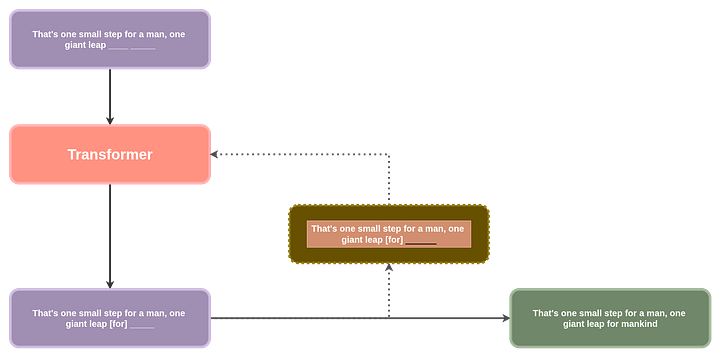
This might look abit too complicated to start with. Let’s try another way to explain this even more simpler., think of your phone’s auto complete feature, it predicts the next word that would come based on the previous word you typed in. The diagram above takes this to a whole new level, it predicts the next word based on the context of all the previous words, it does this a number of times untill it has a whole sentence, paragraph or paragraphs, just like the way we get in ChatGPT or any other chatbot.
This article marks the first in a series of articles on transformer LLMs. Focusing on how the Transformer architecture is used in Large Language Models specifically.
A Transformer based LLM is a system that takes in text and generates probabilities of the next likely word, it is done iteratively untill we get a complete sentense. You can think of the words as tokens in LLM lingo. Each operation to generate a new word is called a forward pass through the model. After each word generation, we add the new word to the already existing words and use that (generated word pluse all previous words) as our new input to the LLM. Why we do this, we’ll look into later on.
The name given to models that consume their previously generated tokens to predict the next token is autoregressive models. Autoregressive models are different from text representation models like BERT, do not worry about what that is for the moment.
Components Of A Transformer LLM Overview
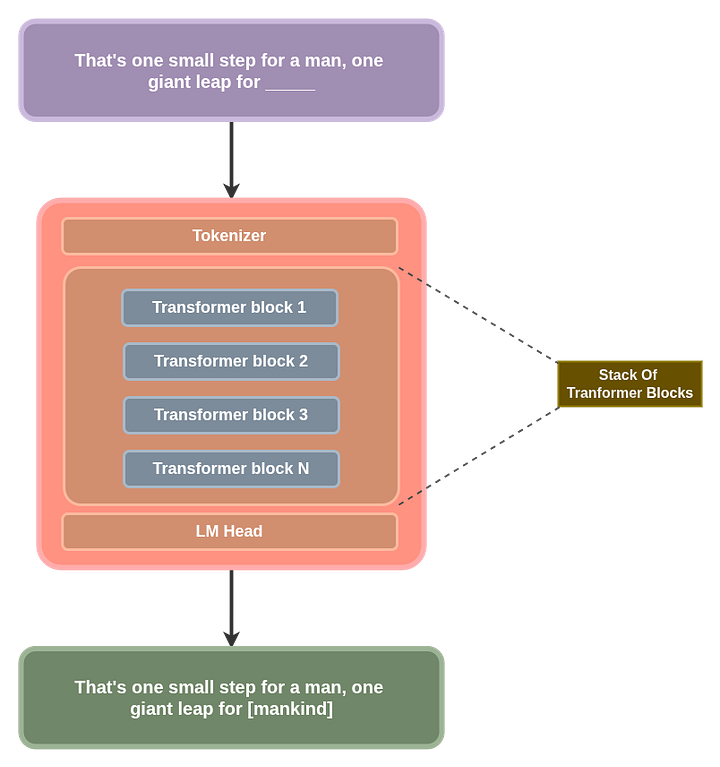
From the general overview of the diagram above, we can take this a step further and break down the whole transformer architecture to understand each piece in more detail. This will give you a hint why we refer to it as a “Transformer LLM” at the end of this article series.
I’ll show you this in a diagram then, we can go over the details, explaining each of the individual pieces one at a time:
Tokenizer
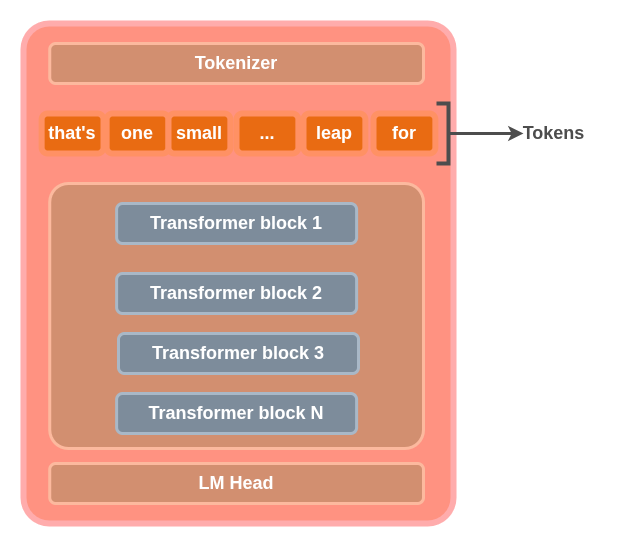
The tokenizer is a section of the transformer LLM that breaks down input text into sub-words that are called tokens. Tokens are not always completely meaningful words, but for the sake of simplicity, we’ll take tokens as atomic meaningful English words, just keep in mind that in the real world, this is not always the case.
A tokenizer has a table of tokens called the tokenizer’s vocabulary. The tokenizer model has a vector representation of each token in its vocabulary. Each of these vectors is called token embeddings. A model’s vocabulary is all the unique words a tokenizer model was trained on, for the mean time and for the sake of simplicity, think of these “words” as your normal English words that make sense eg: cat, dog etc. In actual real world implementation, this may not be the case. A tokenizer’s vocabulary size usually ranges from 50,000 to about 100,000, some even more than this or less. I can’t stress this enough.
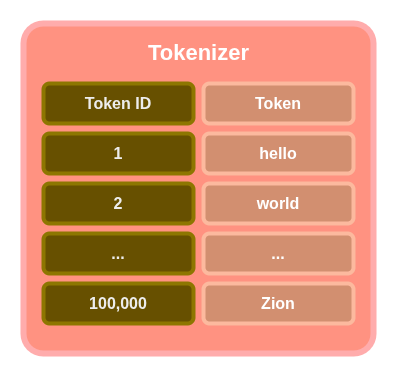
These token embeddings are used in the Tranformer blocks to perform computations. We’ll dive into this just abit later on. For the mean time, you can think of the tokenizer as breaking text inputs to sub-words(tokens). Refer to the diagram below:
Why don’t we just have tokens as characters, do you think this would be a better approach? This is a my little reading assignment to you. Let us know what you found out in the comment section, but later on in the article, this is explained in depth as part of tokenization strategies.
Here is some Python code to work with a Tokenizer, for you to follow along, create a Google account and create a notebook, use this link to do that:
- Create a Huggingface account and get yourself a Huggingface token. Once you have the token, you need to add it to the secret section of your notebook in Google colab

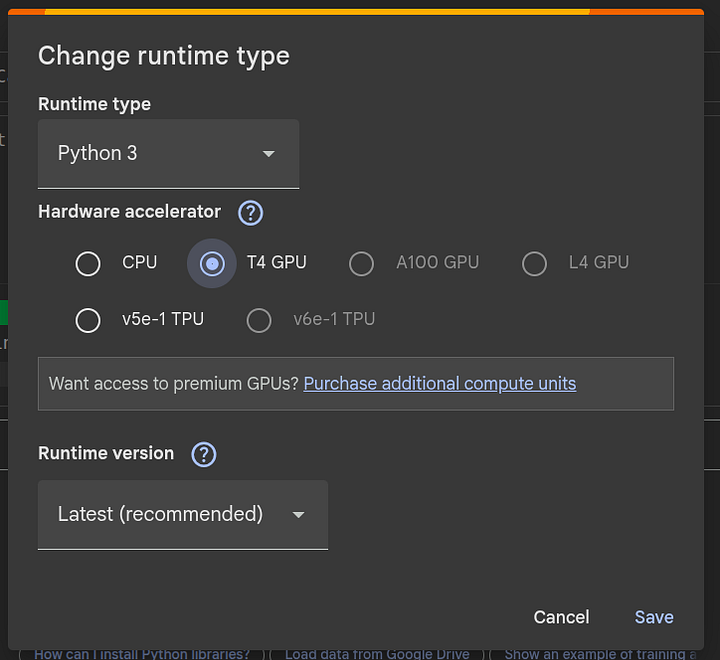
2. Change your Colab notebook runtime to T4 GPU, we’ll need a GPU to run the tokenizers:
3. We’ll work with the GPT-2 and GPT-4 tokenizers, you can read more about them from here.
4. Once you have all these in place, we can start to code!
First, let’s import the libraries we’ll use, you do not have to install anything to get started. Just create a cell and add in this block of code and run it.
from transformers import AutoModelForCausalLM, AutoTokenizer
Second, we can bring in our tokenizer of choice from Huggingface, note that, this will not work if your Hugging face token is not loaded in your Colab environment variables. We’ll be using the gpt2 tokenizer in this case.
tokenizer_name = "openai-community/gpt2"
tokenizer = AutoTokenizer.from_pretrained(tokenizer_name)
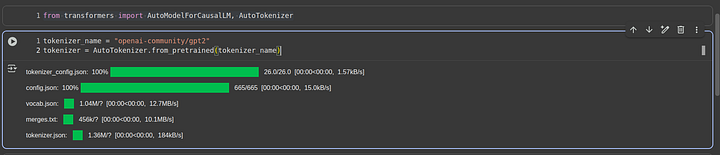
Once you run this code, it will take sometime to download and load in the tokenizer, here is what I get from running this code:
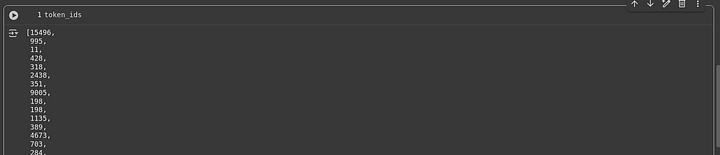
Now, I want to get the ID of each token in a sentence we’ll create in a moment. After runing this code, we’ll get a list of token IDs, remember this diagram? Yup, keep it in mind, it will help understand things much easier through out the whole article.
sentence = """Hello world, this is code with Prince

We are learning how to use LLM transformers
The current year is 2025-October
if __name__ == "__main__":
    print("Hello World")

console.log("Hello World")

(300 + 200)/400 * 840 + 847

Hell yeahh!!!
"""


token_ids = tokenizer(sentence).input_ids
I want go generate some beautiful coloration for each token, just to give you a better understanding:
colors_list = [
    '102;194;165', '252;141;98', '141;160;203',
    '231;138;195', '166;216;84', '252;217;47'
]

for idx, t in enumerate(token_ids):
    print(f"\x1b[0;30;48;2;{colors_list[idx % len(colors_list)]}m" + tokenizer.decode(t) + "\x1b[0m", end=" ")
Running this code, you should get something like this:
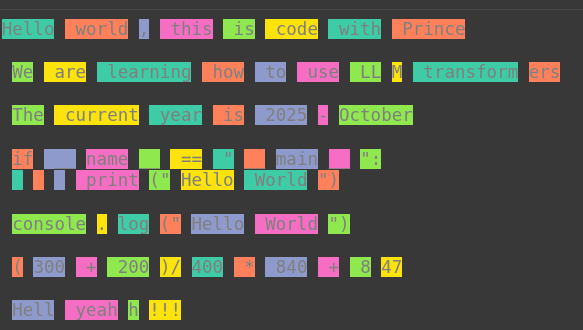
From the image above, we can see that the word LLM is not tokenized as a single word, instead it is split into two sub-words LL and M , remember I mentioned earlier that, sometimes in the real world application of tokenization, inputs are not always broken down into meaningful English words. When we use a different tokenizer, we’ll see that, the tokenizer might threat things abit differently, each tokenizer has it’s own way of handling text. To try other tokenizers, let’s create a utility function we can use to make life easier for use to test out different tokenzers.
def test_tokenizer(tokenizer_name, sentence, colors_list):
    tokenizer = AutoTokenizer.from_pretrained(tokenizer_name)
    token_ids = tokenizer(sentence).input_ids

    for idx, t in enumerate(token_ids):
        print(f"\x1b[0;30;48;2;{colors_list[idx % len(colors_list)]}m" + tokenizer.decode(t) + "\x1b[0m", end=" ")
GPT-2 Tokenizer
From the above code, we have utilized the GPT-2 tokenizer. For more knowledge on the GPT-2 tokenizer, here is a short description of this tokenizer:
The GPT-2 tokenizer utilizes the Byte Pair Encoding (BPE) algorithm to efficiently encode text into tokens suitable for language modeling tasks. It is known for its byte-level tokenization strategy and its large vocabulary.
Tokenization Method: Byte Pair Encoding
GPT-2’s tokenizer uses a modified version of Byte Pair Encoding (BPE), which splits text into bytes and then learns merge rules to create frequently-occurring subwords or words as single tokens. This approach allows the model to handle any input text, including previously unseen words, without relying on an unknown token symbol and ensures robust handling of diverse datasets.
Vocabulary Size
The vocabulary consists of 50,257 tokens, which include:
- All possible byte values (256 base tokens)
- A special end-of-text token
- 50,000 additional tokens learned from BPE merge operations during training.
Special Tokens
GPT-2 uses the special token <|endoftext|> to signal the end of a text sequence. This token plays a crucial role in tasks like text generation where the model must recognize the boundary between generated and input text.
Do not worry about all these terminologies for the moment, it will all come clear as we go through this series of articles. Yes, I know, alot of new concepts, just hang on.
GPT-4 Tokenizer
The GPT-4 tokenizer from Xenova adapts OpenAI’s tokenization logic, providing a highly efficient encoding system ideal for both natural language and programming tasks.
Tokenization Method: Byte Pair Encoding
This tokenizer uses Byte Pair Encoding (BPE), which helps break down text into byte-level subword units and efficiently merges frequent patterns into single tokens. It supports nuanced tokenization, handling not only standard text but also structured formatting essential for code.
Vocabulary Size
The GPT-4 tokenizer features a vocabulary size of approximately 100,000 tokens. This expanded set allows most words and many common code patterns, including white spaces and keywords, to be represented with fewer tokens than earlier generations.
Whitespace and Coding Support
Whitespace characters such as spaces and newlines are represented as distinct tokens, which greatly enhances the model’s ability to understand and generate code, especially in Python. For example:
- Four spaces (used for indentation in Python) are represented as a single token, streamlining the encoding of code structure.
- Python-specific keywords like
elifcan have their own unique token, increasing the modeling accuracy for programming languages.
Significance of Whitespaces and Special Tokens
- The ability to represent whitespaces as dedicated tokens is essential for code comprehension and generation, because it directly impacts how models track indentation and structure. Something that the GP2 tokenizer does not capture well in it’s tokenization.
- Previous tokenizers may represent each whitespace as an individual token, complicating indentation tracking. GPT-4’s approach provides concise tokens for complex whitespace patterns, facilitating better code modeling and text formatting.
More reading: https://huggingface.co/Xenova/gpt-4
Here is the code to test it out:
sentence = """Hello world, this is code with PrinceWe are learning how to use LLM transformers

The current year is 2025-October

if __name__ == "__main__":
    print("Hello World")

console.log("Hello World")

(300 + 200)/400 * 840 + 847

Hell yeahh!!!"""
test_tokenizer(
    tokenizer_name = "Xenova/gpt-4",
    sentence = sentence,
    colors_list=colors_list
)
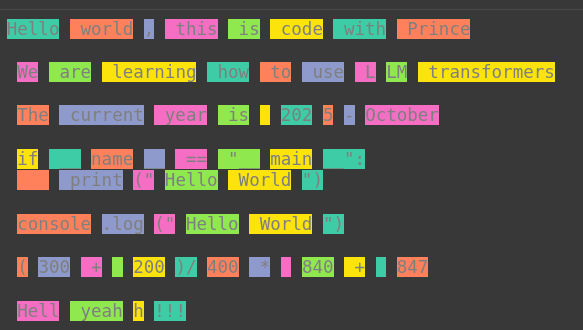
StarCoder2 Tokenizer
StarCoder2 (2023) is a highly specialized code generation model designed to excel at programming tasks across 600+ languages, with several features distinguishing its tokenizer and handling of code-specific requirements.
StarCoder, an advanced Large Language Model (LLM) designed specifically for coding, was developed by Leandro von Werra and Loubna Ben Allal and introduced in May 2023 as part of the BigCode initiative [https://metaschool.so/articles/starcoder]
Tokenization Method: Byte Pair Encoding (BPE)
StarCoder2 utilizes Byte Pair Encoding, allowing it to segment code and text into frequent subword units for efficient representation. This approach yields better generalization over programming constructs, identifiers, and unconventional human language inputs.
Vocabulary Size
The model’s vocabulary size is 49,152 tokens a balance optimized for code generation and natural language support. This enables coverage across programming terms, symbols, numbers, and repository-specific keywords.
Whitespace and Digit Handling
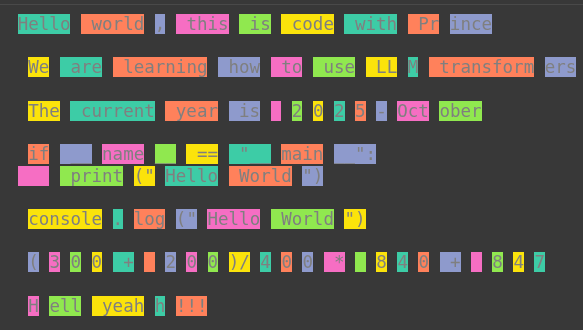
StarCoder2 encodes a sequence of multiple white spaces as a single token, improving its ability to track indentation and code formatting. Each digit is assigned its own token, unlike in GPT-2, where some multi-digit numbers can be merged as a single token, resulting in inconsistent math representations. For example, 840 may be one token in GPT-2, but 847 is split into two. StarCoder2 standardizes each digit, aiding tasks in math and code.
Special Tokens for Code, Repositories, and Filenames
This model reserves special tokens for important code organization elements, such as repository names and filenames, enabling precise relationships and references between functions, files, and requests across codebases. This feature significantly boosts StarCoder2’s ability to generate, link, and update code spread across multiple files and modules.
More reading: https://huggingface.co/bigcode/starcoder2-15b
Here is the code and it’s output:
test_tokenizer(
    tokenizer_name = "bigcode/starcoder2-15b",
    sentence = sentence,
    colors_list=colors_list
)
Galactica
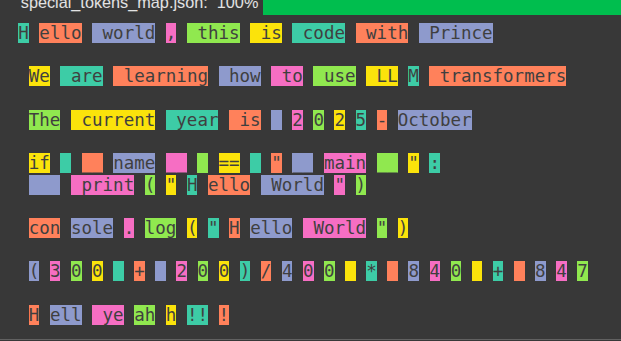
Talking of tokenizers for coding and math, Galactica is a tokenizer from Facebook, below is a short description of it, you can try it out on your own later on.
- Includes special tokens to handle citations, reasoning, math, amino acid sequences and DNA sequences.
- Tokenization method: Byte Pair Encoding (BPE)
- Vocab size: 50,000
- Galactica is similar to StarCoder2 in that they all have tokens for white spaces of different lenghts. The advantage of this model is that it, takes it a step further and also has tokens for tabs.
test_tokenizer(
    tokenizer_name = "facebook/galactica-1.3b",
    sentence = sentence,
    colors_list=colors_list
)
Types Of Tokenization Methods
Now that we had a practical overview of what tokenizers are and how they fit into the Transformer LLMs. You can think of these “Types” as strategies or techniques. Each strategy of a tokenizer has its own strengths and weaknesses. The different methods you use can have an impact on the model’s vocabulary size, efficiency, ability to new complex structures in natural language and so much more. Let’s look into the different types of tokenizers that we have.
character Tokenization
This is the simplest to understand when it comes to tokenization. Each letter, space and punctuation marks are treated as single tokens on its own.
Example:
word: "Hello"
Tokenized: ["H", "e", "l", "l", "o"]
This method is quite good because all possible combinations of characters of a given language can be processed by the tokenizer correctly. But, the downside is that we’ll have too many token sequences which not only increase processing time but also make it harder for models to capture meaning or context of a given input.
Word Tokenizers
This is similar to character tokenizer but, instead of creating separate tokens for each character, we create tokens for each word. I used this to simplify concepts at the beginning of the article, but it’s quite different in the real world applications we went over, right?
The limitations of this approach is that, a language has thousands of words, each word can have its singular, plural, continuation form (*ing) etc. The same word with the same meaning but, the tokenizer might treat the varying forms of the same words completely differently, leading to creation of tokens for each word separately. This leads to huge vocab sizes and long sequence of tokens that the Transformer LLM has to process.
Example:
Sentence: "I like programming in Python"
Tokenization: ["I", "like", "programming", "in", "Python"]
Subword Tokenization
This is a combination of the two previous methods, it breaks inputs into subwords and sometimes whole words. This allows the model to efficiently handle common words while breaking uncommon words down to much simpler levels it can handle. This tokenization method is the most commonly used method for Transformer LLMs. One common algorithm used here is the Byte-Pair encoding (BPE) which can handle any text by representing it as a subword unit at the byte level, this allows for processing of different words from different languages and even emojis.
This also allows models to introduce special tokens to show positional information in text, for example beginning-of-sequence (BOS) and end-of-sequence (EOS).
Here are some examples of tokenization methods and different tokenizers that use these methods.
- Byte Pair Encoding: GPT
- WordPiece: BERT
- Unigram Language Modeling: T5
Example:
Word: "transformers"
Tokenization: ["transform", "ers"]
Byte Pair Encoding (BPE) Explained with Example
Step-by-Step Example
Training Corpus:
low lower lowest
Step 0: Initialize Vocabulary
Start with all unique characters (including space as _):
Vocabulary = {l, o, w, e, r, s, t, _}
The corpus is split into characters:
l o w _ l o w e r _ l o w e s t
Step 1: Merge the Most Frequent Pair
Most frequent pair: “l o”
Merge → “lo”
Vocabulary = {l, o, w, e, r, s, t, _, lo}
Corpus = lo w _ lo w e r _ lo w e s t
Step 2: Merge Next Frequent Pair
Most frequent pair: “lo w”
Merge → “low”
Vocabulary = {l, o, w, e, r, s, t, _, lo, low}
Corpus = low _ low e r _ low e s t
Step 3: Merge Next Frequent Pair
Most frequent pair: “low e”
Merge → “lowe”
Vocabulary = {l, o, w, e, r, s, t, _, lo, low, lowe}
Corpus = low _ lowe r _ lowe s t
Step 4: Merge Again
Most frequent pair: “lowe r”
Merge → “lower”
Vocabulary = {l, o, w, e, r, s, t, _, lo, low, lowe, lower}
Corpus = low _ lower _ lowe s t
Step 5 : Final Merges
“lowe s” → “lowes” and “lowes t” → “lowest”
Final Vocabulary:
{l, o, w, e, r, s, t, _, lo, low, lowe, lower, lowes, lowest}
Now BPE has learned meaningful sub-words like:
low, lower, lowest
Handling New Words
After training, BPE can tokenize unseen words using known sub-words.
Example 1: “lowering”
Not in vocabulary, so split into:
["lower", "i", "n", "g"]
Example 2: “lowly”
Not in vocabulary, so split into:
["low", "l", "y"]
The model still understands most of the meaning because it recognizes “low” and “lower” from training.
Why It’s Useful
BPE helps NLP models:
- Represent rare or unseen words using familiar pieces
- Reduce vocabulary size while keeping semantic meaning
- Improve generalization and efficiency
That’s why algorithms like GPT use BPE as their core tokenization method.
NOTE: The rules by which we merge are called “merge rules”.
Visualise how the GPT-4 encoder encodes text
We can have a quick demo of how this works using the tiktoken package from OpenAI. With this package you can visualize the example and steps we went over in the previous section above. Let’s get to the code!
First, we need to install the package:
pip install tiktoken
Once installed, we can write the code to visualize how GPT-4 tokenizer tokenizes text:
from tiktoken._educational import *

enc = SimpleBytePairEncoding.from_tiktoken("cl100k_base")
enc.encode("low lower lowest lowering! 840 847.")
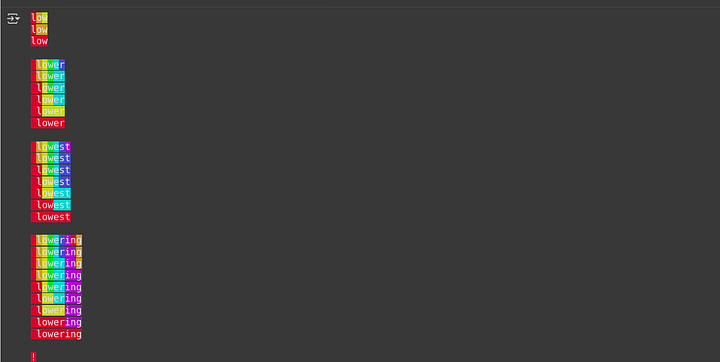
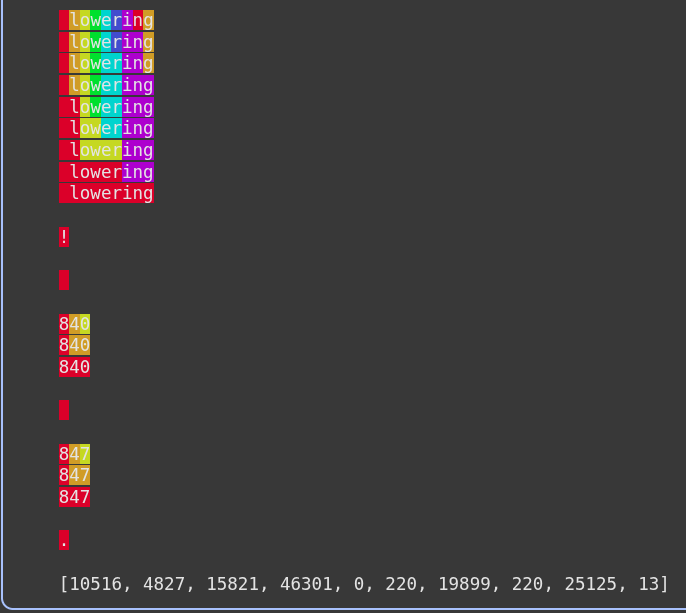
From this diagram above, we can see how first the input is split into characters and merge rules are created to combine them together.
Tokenization Behaviour
Tokenization behaviour is determined by a couple of things:
- Tokenization method (BPE, Word-based, Character based)
- Initialization parameters (Vocabulary size (30K, 50K, 100k), special tokens(masking tokens, CLS tokens, unknown tokens, padding tokens, end of text tokens, beginning of text tokens), Capitalization)
- Domain of the data the tokenizer targets(coding, language etc)
You can read about it here: https://huggingface.co/docs/transformers/en/tokenizer_summary
Extra Knowledge
After a tokenizer is initialized and train on vast amounts of data, it is then used to train it’s associated language model. This create a permanent link between the tokenizer itself and the language model. This in the sense that, you can not use the languag model with a tokenizer it was not trained on.
Conclusion
Congratulations for making it to the end! We have taken our first steps towards understanding Transformer Large Language Models. Understanding tokenization lays the foundation that we can then build on, all the way to understanding the whole architecture of a large language model. Make sure to practice with the code in this article and be hands on with it. In the next article, we’ll dive into how this can be used when it comes to embeddings, we’ll then build a simple demo project on working with embeddings as well.
Other platforms where you can reach out to me:
Happy coding! And see you next time, the world keeps spinning.
References
Tokenizer
We’re on a journey to advance and democratize artificial intelligence through open source and open science.huggingface.co
Summary of the tokenizers
We’re on a journey to advance and democratize artificial intelligence through open source and open science.huggingface.co
Keras documentation: GPT2Tokenizer
Keras documentation: GPT2Tokenizerkeras.io
blogpost
Tokenization is a fundamental concept in large language models (LLMs), but it can be a source of frustration for many…yannael.github.io